Day05 : Terraform Variables
Mastering Terraform Variables in AWS: Input, Output, and Local Variables
Day 5 of 30 Days of AWS Terraform – Learn how to use variables effectively to make your Terraform code reusable, maintainable, and environment-agnostic.
Why Do We Need Variables in Terraform?
In real-world scenarios, you'll manage hundreds or thousands of resources like S3 buckets, VPCs, and EC2 instances.
Problems without variables:
Repetition of the same values across multiple files
Typos creating inconsistent setups
Hard to maintain when you need to update values everywhere
The fix is to define values once using variables and reference them everywhere.
Terraform Variable Types Flow:
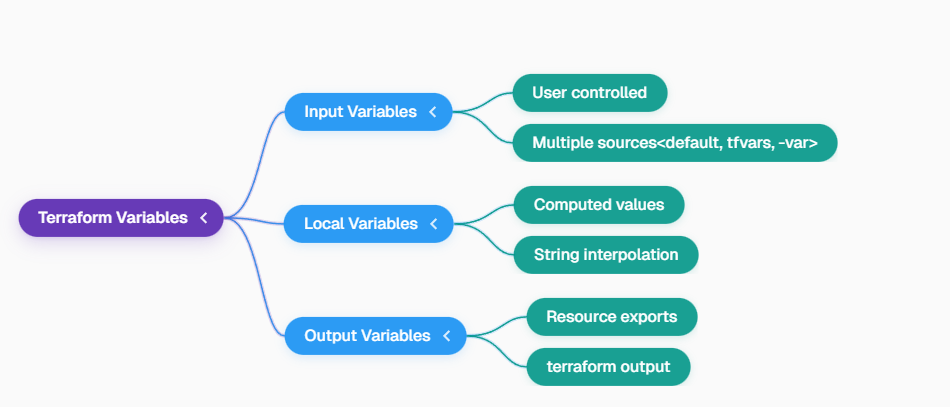
Flow 2: Detailed View
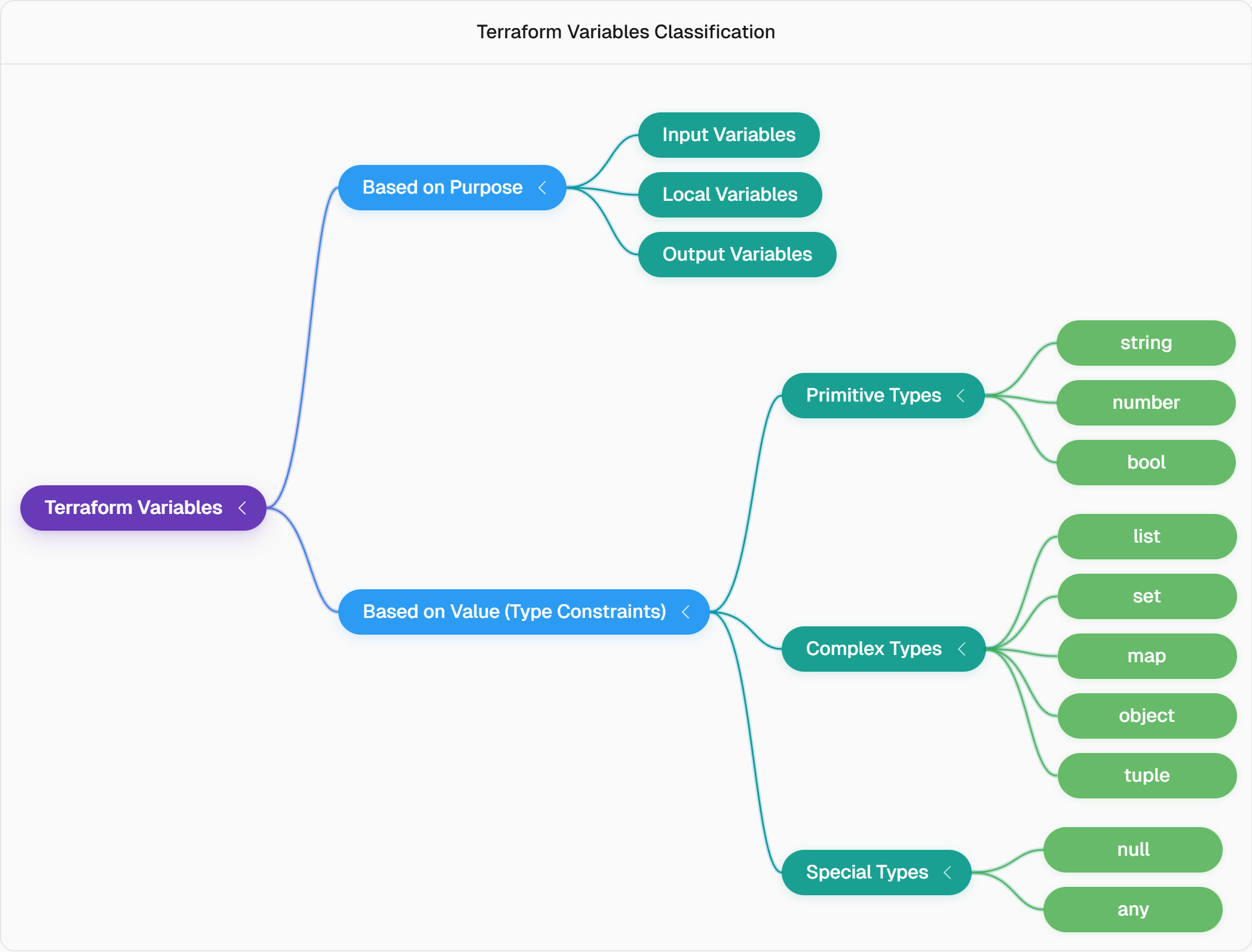
Terraform Variable Types
1. Input Variables
Input variables accept values from the user and are used across the configuration.
Basic example:
variable "environment" {
  default = "dev"
  type    = string
}
2. Local Variables
Local variables help you create reusable or computed values inside the same module.
Example:
// locals
# locals {
#     // can use like this also
#  env = var.environment
#  vpc_name = "${local.env}-VPC"
#  instance_name = "${local.env}-Instance"
# }


locals {
  vpc_name = "${var.environment}-VPC"
  instance_name = "${var.environment}-Instance"
}
Useful for naming patterns or reusable strings.
3. Output Variables
Outputs show values after terraform apply or pass values to other modules.
Example:
output "vpc_id" {
  value = aws_vpc.main.id
}

output "instance_id" {
    value = aws_instance.example.id
}
Variable Precedence
Terraform follows this priority order:
Default value
Environment variables
terraform.tfvars
CLI -var flag

Complete Working Example (Your Code Added)
Your full code with variables, locals, S3 backend, VPC, EC2, and outputs is inserted here.
terraform {

    backend "s3" {
        bucket = "anjali-gupta-bucket-76"
        key    = "terraform.tfstate"
        region = "eu-north-1"
        use_lockfile = true
    }

  required_providers {
    aws = {
      source  = "hashicorp/aws"
      version = "~> 6.0"
    }
  }
}

provider "aws" {
  region = "eu-north-1"
}

variable "environment" {
  type        = string
  default     = "dev"
}

variable "region" {
  type        = string
  default     = "eu-north-1"
}

locals {
  vpc_name = "${var.environment}-VPC"
  instance_name = "${var.environment}-Instance"
}

resource "aws_s3_bucket" "first_bucket" {
  bucket = "anjali-gupta-bucket-76"
  region = var.region

  tags = {
    Name        = "My bucket"
    Environment = var.environment
  }
}

resource "aws_vpc" "sample" {
    cidr_block = "10.0.1.0/24"
    region = var.region
    tags = {
      Environment = var.environment
      Name = local.vpc_name
    }
}

resource "aws_instance" "example" {
  ami           = "resolve:ssm:/aws/service/ami-amazon-linux-latest/al2023-ami-kernel-default-x86_64"
  instance_type = "t2.micro"
  region        = var.region

  tags = {
    Environment = var.environment
    Name = local.instance_name
  }
}

output "instance_id" {
    value = aws_instance.example.id
}

output "vpc_id" {
    value = aws_vpc.sample.id
}
Commands to Run
terraform init
terraform plan
terraform apply --auto-approve
terraform output
terraform destroy --auto-approve
Best Practices Checklist
Use input variables for environment-specific values
Use local variables for naming conventions
Define outputs for important resource IDs
Store defaults in terraform.tfvars
Use CLI -var for sensitive values
Destroy test resources after practice
Common Errors & Solutions
| Error | Cause | Solution |
invalid resource type | Wrong resource name | Check AWS Provider Docs s |
AMI invalid | Wrong AMI ID | Use valid AMI from AWS console or docs s |
Permission denied | IAM lacks permissions | Add EC2/VPC permissions s |
variable not found | Wrong precedence | Check variable definition & precedence s |
Video:
Key Takeaway
Variables transform Terraform from script to infrastructure factory. Define once, deploy everywhere. Environment promotion? Just swap tfvars files. 💪
Practice challenge: Create input vars for region/environment, locals for resource names, outputs for IDs. Run precedence tests!
Huge thanks to Piyush Sachdeva for the crystal-clear hands-on demo!
#30DaysOfAWSTerraform Day 5 complete!